NORA
A production-staged AI support operations system
01 - INSPIRATION
NORA came from a very practical support-desk problem: logging service calls was taking a person out of the team.
In a small support team, that matters. When one person is tied up reading incoming emails, creating service calls, checking who should own them, and moving messages into the right Outlook folders, the team loses capacity at exactly the point where customer work is arriving. A lot of that process is important, but not all of it needs to be manual.
The problem was bigger than logging alone. Someone also had to maintain rota context, understand who was working, who was on support, who was unavailable, and who had stepped away for lunch. That information existed, but it was not visible enough in one operational place.
NORA was designed to automate the repeatable parts of that workflow while keeping people in control of the decisions that matter. The goal was to take service-call logging, email movement, assignment visibility, rota awareness, and approval flow out of scattered manual work and bring them into one controlled support operations surface.
02 - MY ROLE & CONTRIBUTION
I defined the product shape, narrowed the MVP, and designed the system around approval-first operations.
That work included:
- framing NORA as an internal support workflow copilot instead of a customer-facing agent
- designing the decision schema for create, update, reassign, manual review, and no-action branches
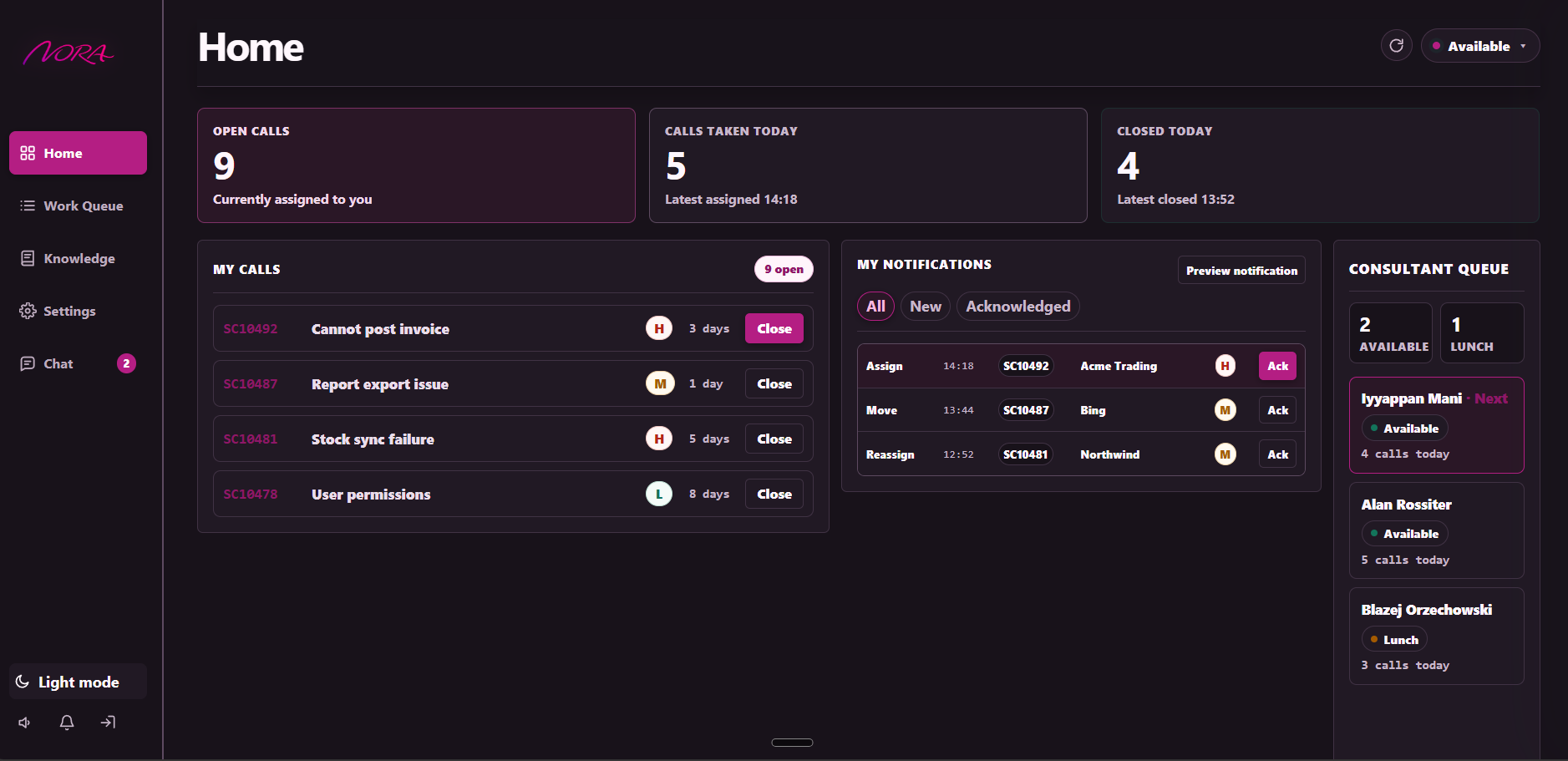
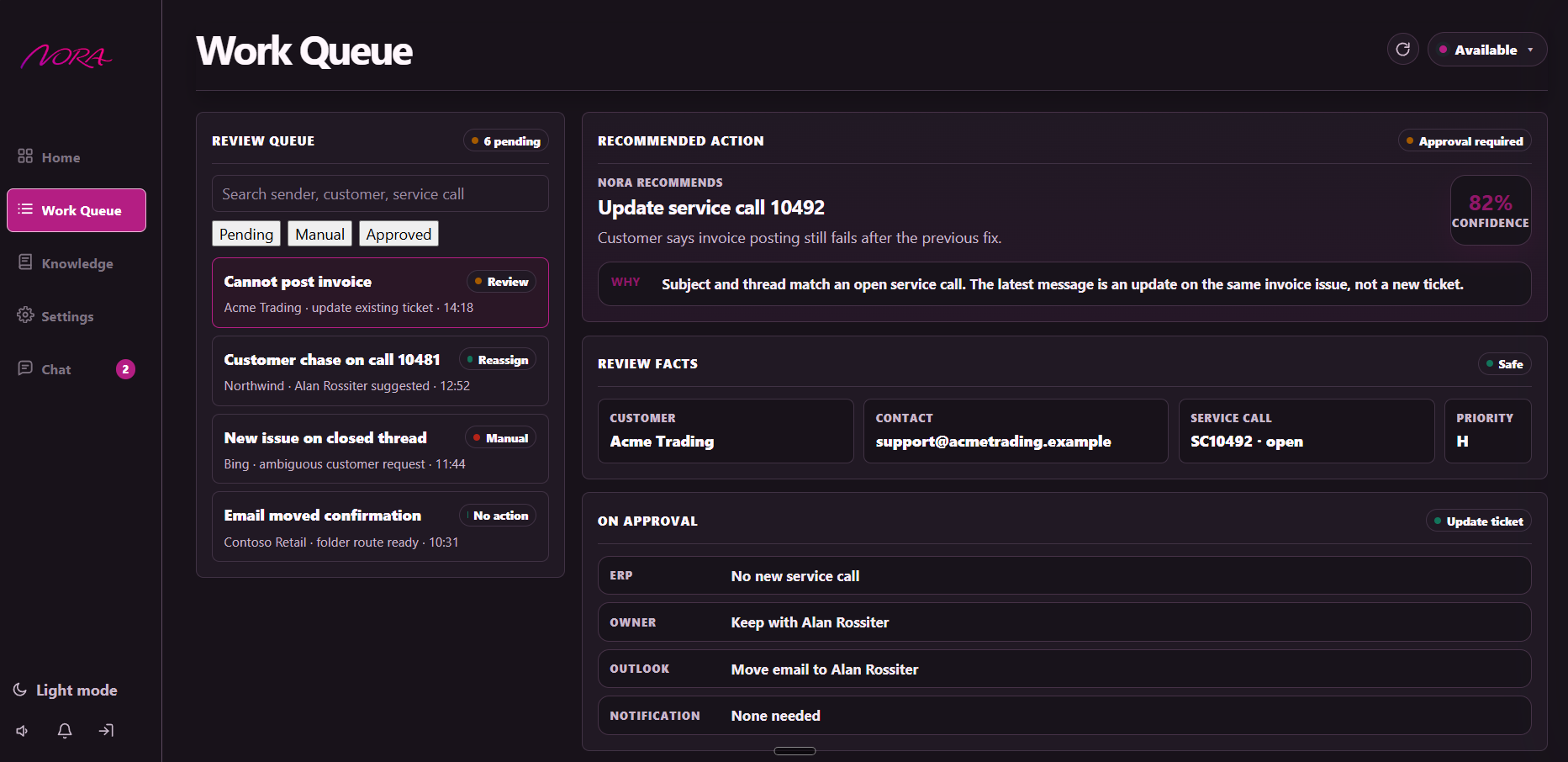
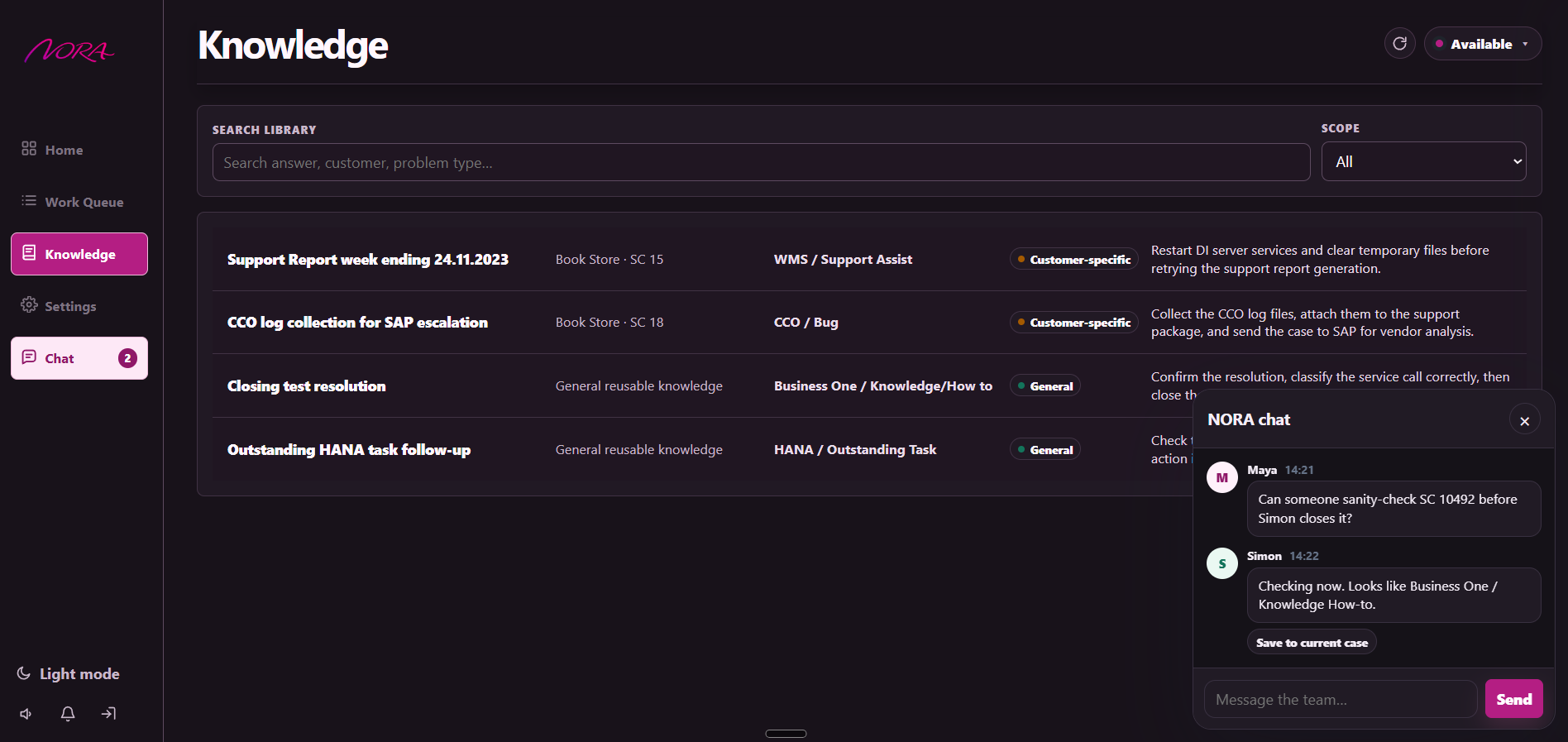
- shaping the portal as the main control surface for Work Queue review, My Calls, Knowledge Library, Team Chat, consultant state, Settings, and system controls
- building the live demo path around Outlook intake, ERP lookup/write actions, consultant mapping, availability policy, and execution audit
- migrating the core persisted state to Postgres-backed runtime domains for Knowledge, Access, Consultants, mappings, availability overrides, execution log, notifications, review queue, and system state
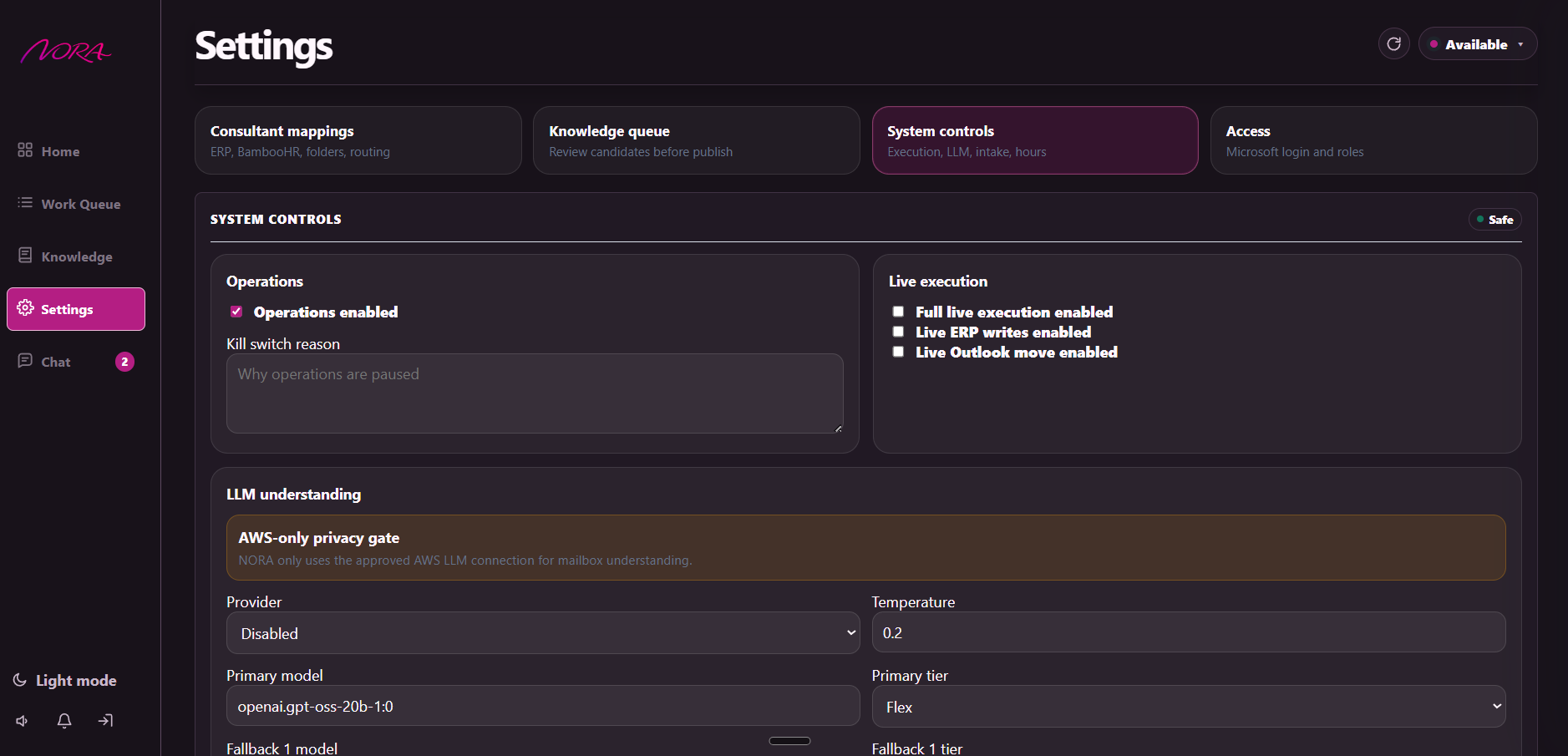
- adding hard safety gates for office hours, kill switch state, live execution, ERP writes, Outlook moves, mailbox intake, and AWS LLM routing
- replacing the earlier general provider picker with AWS-only LLM routes for clearer GDPR/compliance posture, while preserving a mailbox-content privacy gate
- adding NORA-native ephemeral Team Chat with instant SSE updates and deliberate save-to-case behavior
- building My Calls so operators can close their own ERP service calls and optionally save resolutions into the Knowledge workflow
- tightening the production staging UI around shared Work Queue and Knowledge surfaces plus role-specific Admin Home and Admin Settings
The important design choice was to keep NORA operationally boring in the right ways. It should be useful because it respects the workflow, not because it tries to look clever.
03 - NORA SYSTEM
Intake Layer
Understanding + Policy Layer
Control Layer
Execution + State Layer
Operator + Admin Surface
04 - PRODUCT SCREENS
05 - TOOLS USED
NORA combines mailbox intake, ERP integration, availability logic, LLM-assisted interpretation, and an operator portal.
- Node.js for the portal server, decision pipeline, mailbox intake, and execution orchestration
- Microsoft Graph for Outlook mailbox reads, thread grouping, and folder moves
- Test ERP API for service-call lookup, creation, and reassignment in a safe demo database
- BambooHR-style availability data for consultant working-state checks and mapping validation
- AWS-only LLM routing for advisory email interpretation, urgency detection, structured context, route fallback, and GDPR/compliance clarity
- Postgres-backed state for Knowledge Candidates, Knowledge Library, Access, Consultants, mappings, availability overrides, execution log, notifications, review queue, and system state
- Portal UI for shared Work Queue review, My Calls, Knowledge Library/Candidates, Team Chat, admin Home, admin Settings, access control, consultant mapping, and kill-switch controls
The stack is deliberately practical. NORA is about joining real operational systems together without losing auditability or control.
06 - CHALLENGES AND HOW I SOLVED THEM
One challenge was separating understanding from authority. An LLM can help interpret a messy email, but it should not own the business decision. I solved that by making the LLM advisory only. It can propose intent, urgency, and summary, but deterministic code still owns ERP lookup, customer matching, consultant validation, policy gates, assignment logic, and execution safety.
Another challenge was thread context. A follow-up email in the same conversation should not create a duplicate case while the original item is still waiting for review. I solved that by storing conversation memory and merging same-conversation follow-ups into the existing non-terminal review item, including the additional Graph message ids so execution can move the whole thread together.
A later challenge was model governance. NORA needed LLM understanding, but support email content creates privacy and compliance pressure. The active direction moved to AWS-only model routing with ordered model/tier fallbacks, a mailbox LLM privacy gate, and fail-closed manual-review behavior when model output is malformed or unavailable. The production-readiness path is to move from prompt-shaped JSON to Bedrock Converse structured output once the required AWS permissions are confirmed.
A third challenge was live execution safety. The demo needed to prove real wiring, but not at the cost of confusing or unsafe actions. I added separate gates for full execution, ERP writes, and Outlook moves, plus an operations kill switch and office-hours enforcement. ERP-backed cases now use the normal Execute flow, which writes to ERP first and only moves the email afterward.
The most subtle challenge was UI honesty. Operators need to see why something is ready, blocked, high priority, manual review, or safe to execute. NORA’s portal evolved to expose policy reasons, assignment validation, priority badges, My Notifications, team status, knowledge candidates, Knowledge Library results, Team Chat save-to-case notes, and system controls instead of hiding the important parts behind one button.
The latest challenge is production fit for a small team. A separate admin cockpit looked impressive but did not match the real operating model. I collapsed the direction into a shared operator shell with role-specific Home and Settings, so admin controls exist without turning the product into a maze.
07 - WHAT I LEARNED
NORA sharpened how I think about useful AI in business operations.
The strongest lessons so far:
- workflow automation needs policy before autonomy
- inbox intelligence is mostly context management, not text generation
- LLM output is more useful when treated as evidence, not authority
- live integrations need separate gates, explicit ordering, and clear audit records
- compliance posture matters as much as model quality when email content is involved
- team coordination should be ephemeral by default, but important context needs a deliberate save-to-case path
- reusable support knowledge needs a review workflow before retrieval or automation
- operator trust comes from showing constraints, blockers, and decisions plainly
The biggest lesson was that real AI systems often become valuable in the handoff points: between email and ERP, between assignment and availability, between recommendation and execution, between automation and human approval.
08 - HOW AI SUPPORTED THE WORK
AI supported the project in two ways.
First, it helped during the build process: shaping architecture, pressure-testing edge cases, accelerating implementation, and refining the portal workflow. Second, it became part of the product through the advisory email-understanding layer.
The boundary stayed clear. AI can help interpret language and surface urgency, but the system still needs deterministic rules, trusted data, privacy gates, AWS route controls, and human-controlled execution gates to be credible.
09 - ROADMAP
Human-in-the-loop automation
Deploy NORA as controlled operational automation: mailbox intake, AI-assisted classification, Work Queue review, human approval, ERP/Outlook execution, and Knowledge capture from real support cases.
Six-month learning window
Use six months of approvals, rejects, manual reviews, execution logs, resolutions, and Knowledge Library entries to identify repeatable patterns and build a higher-confidence training set.
Semantic intelligence layer
Convert the approved Knowledge Library into a semantic retrieval layer, then train or tune model components against the operational history so NORA can reason from validated local support knowledge.
Case-by-case automation
Automate only proven, low-risk repetitive categories first. Keep human approval for new issue types, unclear intent, high-risk actions, or cases where confidence and policy checks are not strong enough.
Level 1 support layer
NORA becomes the first support layer for repetitive questions, routine logging, routing, known fixes, and knowledge-backed responses, while consultants focus on Level 2 support, exceptions, escalations, and complex customer work.
The long-term goal is not to remove consultants from support. It is to move them out of repetitive Level 1 work and let NORA handle the known patterns, while humans stay responsible for complex cases and exceptions.
10 - CURRENT STATE
NORA is best described as production-staged internal workflow software. The portal is running, mailbox intake is wired, AWS-only email understanding is configured with route fallback and a mailbox-content privacy gate, live execution gates are on, and the test ERP plus Outlook connectors have been validated.
The persisted runtime state has been migrated across the major operational domains: Knowledge Candidates, Knowledge Library, Access, Consultants, Consultant Mappings, Availability Overrides, Execution Log, Notifications, Review Queue, and System State are Postgres-backed, with JSON retained as rollback/fallback context where useful. Ordinary Team Chat remains intentionally ephemeral/in-memory; only saved-to-case chat notes become part of review/case state.
The live product surface now includes My Calls for linked operators, Knowledge Library and Candidates subtabs, portal-native My Notifications, consultant status/availability controls, ephemeral Team Chat with SSE updates, and privileged Settings for Access, Consultant mappings, Knowledge queue review, mailbox intake, AWS LLM routes, live execution controls, kill switch, routing, and office hours.
The intended operating flow is simple: mailbox intake creates the review item, the operator approves it in the portal, then Execute Live performs the ERP action first, moves the Outlook message second, and records the audit trail. Manual-review items remain operator-controlled and route to the configured review folder without ERP writes. My Calls closes personal assigned work and can turn useful resolutions into reviewed Knowledge Library entries.
That makes NORA one of the most practical projects in the portfolio. It shows applied AI in a real support workflow: not replacing judgment, but compressing messy intake, routing, validation, team coordination, knowledge capture, admin control, compliance-aware LLM use, and execution steps into something a small team can understand and control.